
your-next-story.mp4
.mp4.wav.mov
Start with your story.
Create a project from a video or audio file. Keep everything organized in a local library, ready to pick up again.
From the first spoken word to the final frame.
Transcribe, edit, and style your captions in one thoughtful
desktop workspace. Powered by Whisper. Entirely on your device.
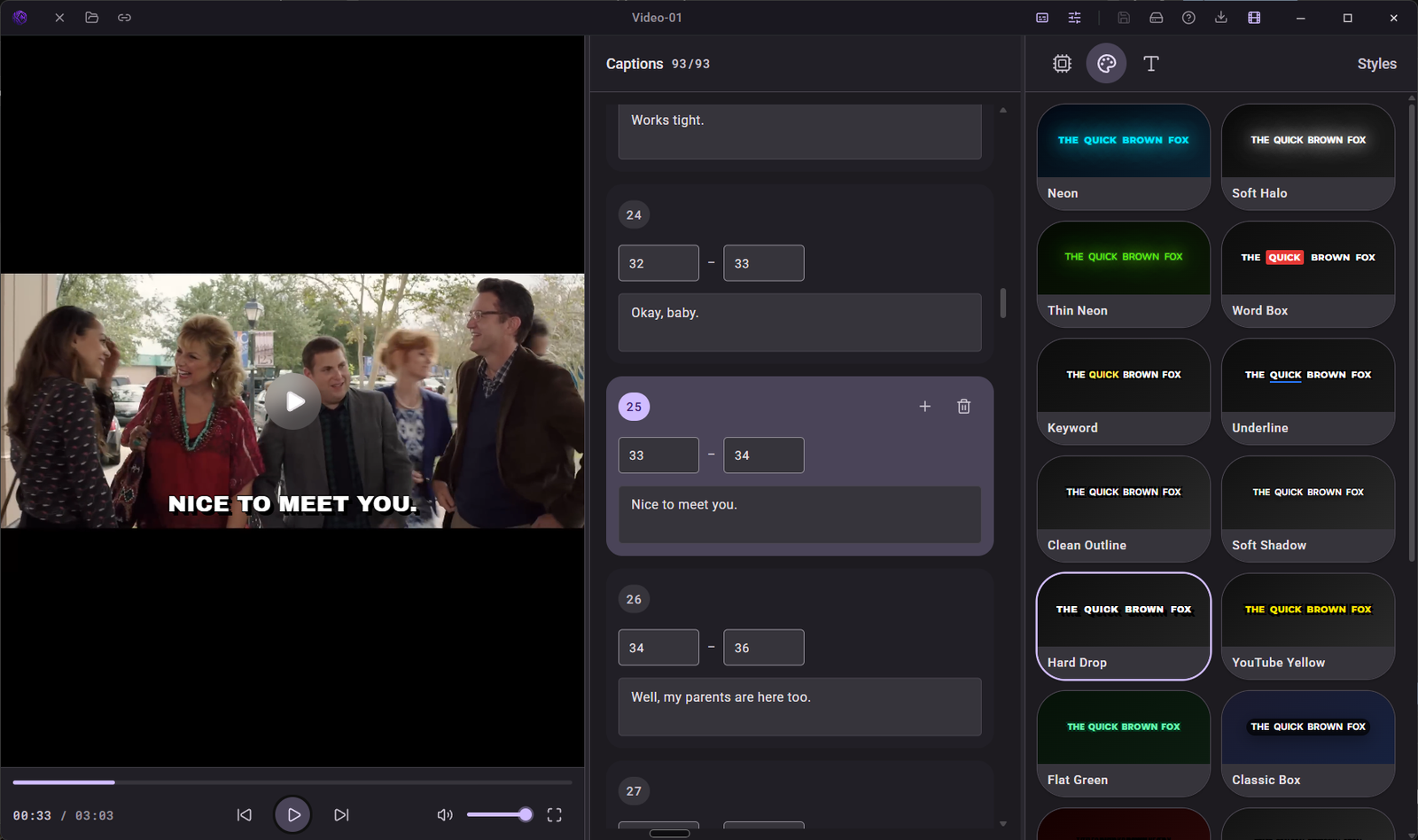
A full workspace. A very focused workflow.
No complicated handoffs. Just a clear path from
your recording to captions that feel like you.
Create a project from a video or audio file. Keep everything organized in a local library, ready to pick up again.
Choose your Whisper model and transcribe. Start with natural phrases or word-by-word captions, then refine the timing.
Shape the look, review your captions, and export a captioned video, subtitle file, or clean transcript.
Quiet and cinematic. Bold and unmissable. Start with a caption preset, then make every detail your own.
Interactive style illustration. Edit your full video in the desktop app.
The useful things, right where you need them.
Built around the way you finish a project.
Edit the text, adjust the timestamps, and watch your changes alongside the video. Your captions stay in your hands.
A story starts with a moment.
Give that moment a voice.
Make every word count.
Go light for a quick draft, or choose a larger model for more demanding audio. Download and manage models in one place.
Local projects and autosaved edits keep your work together. Moved your source file? Relink it and carry on.
Burn your styled captions into an MP4, export an SRT for your next edit, or keep the words as a TXT transcript.
Your audio stays on your computer for transcription. Your projects live on disk. Your exports are processed locally. Download a model once, then settle into your own offline workflow.
No cloud upload for transcriptionYes. Transcription, caption editing, and video export run on your computer. You need an internet connection to download the app and your chosen Whisper model first. Once the model is downloaded, you can work offline.
Import common video formats including MP4, MKV, MOV, and WebM, or audio files such as WAV, MP3, and M4A. WhisperStudio uses FFmpeg to prepare audio for transcription.
Yes. Export captions as an SRT subtitle file or a TXT transcript. You can also export an MP4 with styled captions burned directly into the video.
Start with Tiny for quick drafts or a smaller machine. Larger models can improve transcription accuracy, but require more memory and processing time. The built-in model library lets you compare and download models, including quantized variants.
WhisperStudio supports Windows 10 and Windows 11 (64-bit), and macOS on Apple Silicon (aarch64). You need at least 4 GB of RAM; 8 GB or more is recommended for longer videos and larger models. Leave extra disk space for downloaded models and exported media.
Caption edits, styles, layout, and generation preferences autosave to your local project. Your original media stays linked to its location on disk. If you move that file, use Relink to reconnect it without losing your captions.
The model library includes multilingual Whisper models as well as English-specific options. Choose a model that supports your audio language. Results depend on the model, language, recording quality, and your hardware.
 YOUR NEXT STORY STARTS HERE
A focused desktop studio for captions that feel like you.
A desktop app that finds the words in your video or audio on your own computer, lets you fix and style the captions, then burns them into the video or saves an SRT file.
Made by NTXM, built by Nitiksh Kumar.